Homey Pro (2026) | Smart Hub for Home Automation
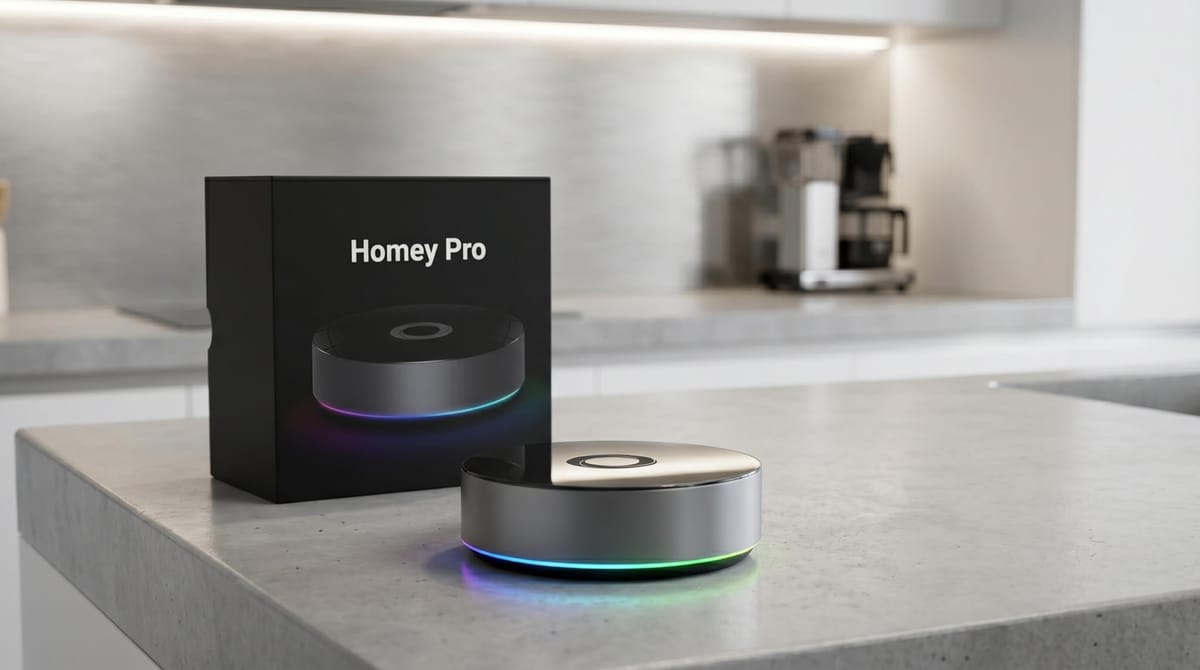
The 2023 Homey Pro is a powerful smart home hub designed for users who want to connect different devices in one place without the complexity of Home Assistant. It supports Zigbee, Z-Wave, Matter, Thread, and infrared, allowing fast performance and reliable control. With its flexible automation system (“Flows”), it helps you create smart routines while minimizing dependence on the cloud.
Key Takeaways
- High compatibility: Connects thousands of devices across Zigbee, Z-Wave, Matter, Thread, BLE, 433 MHz, Wi-Fi, and IR from a single hub
- Fully local: Automations run on device with no cloud required, including local backups
- Intuitive interface: The app and web UI are widely described as the most polished in the smart home hub category
- Advanced automation: Advanced Flows support complex, branching multi-trigger scenarios at no extra cost
- Best for: Users who want to move beyond Alexa or Google Home without writing code or managing a home server
At a Glance
| Price | $534.99 |
| Best For | Multi-protocol, local-first home automation without coding |
| Protocols | Zigbee, Z-Wave, Matter, Thread, BLE, Wi-Fi, 433 MHz, IR |
| RAM | 4 GB (2026 model) |
| Software Support | Until at least June 2031 |
| Rating | ★★★★☆ (4.2/5) |
What is Homey Pro
Homey Pro is a local-first smart home hub made by Athom that connects devices from over 1,000 brands through a single app. It supports eight wireless protocols (Zigbee 3.0, Z-Wave 700 Series, Matter v1.3, Thread, Bluetooth LE 5.0, Wi-Fi 2.4/5 GHz, 433 MHz, and Infrared) and runs all automations locally without a mandatory cloud subscription. As of 2026, it is priced at $399 and ships with 4 GB RAM and software support guaranteed through at least June 2031.
What Changed in the Homey Pro (2026)?
Athom released the Homey Pro (2026) in late 2025 at the same price as its predecessor. The single but meaningful upgrade: RAM doubled from 2 GB to 4 GB LPDDR4.
That extra memory matters for anyone running a large smart home. Homey Pro's RAM powers every active app, running Flow, live device data, and background processes simultaneously. With 4 GB, Athom states the hub can comfortably run well over 100 Homey Apps without performance degradation.
Everything else carries forward unchanged: the eight-protocol radio stack, the 1.5 GHz Quad Core ARMv8 processor, the 8 GB eMMC storage, and the full software feature set from the 2023 model. Both generations are treated as the same hardware tier and receive identical software updates through June 2031.
What Are Homey Pro's Hardware Specifications?
| Specification | Homey Pro (2026) | Homey Pro (2023) |
|---|---|---|
| Price | $534.99 | $534.99 |
| Chip | Raspberry Pi CM4 | Raspberry Pi CM4 |
| Processor | 1.5 GHz Quad Core ARMv8 | 1.5 GHz Quad Core ARMv8 |
| RAM | 4 GB LPDDR4 | 2 GB LPDDR4 |
| Storage | 8 GB eMMC | 8 GB eMMC |
| Wi-Fi | 2.4 GHz + 5 GHz | 2.4 GHz + 5 GHz |
| Bluetooth | BLE 5.0 | BLE 5.0 |
| Software Support Until | June 2031 | June 2031 |
Which Protocols Does Homey Pro Support?
Most smart home hubs support two or three protocols. Homey Pro includes all eight natively, with no external USB adapters required. This gives it stronger and more reliable radio coverage than adapters plugged into USB ports.
| Protocol | Standard | Common Use |
|---|---|---|
| Zigbee | Zigbee 3.0 | Smart bulbs, motion sensors, switches |
| Z-Wave | 700 Series | Door locks, thermostats, roller blinds |
| Matter | v1.3 | Cross-platform interoperability standard |
| Thread | Border Router | Low-power mesh networking for sensors |
| Bluetooth LE | 5.0 | Proximity sensors, asset trackers |
| Wi-Fi | 2.4 + 5 GHz | IP cameras, smart speakers, LAN devices |
| 433 MHz | RF | Legacy remotes, outdoor weather stations |
| Infrared | IR | TVs, air conditioners, AV receivers |
What Features Does Homey Pro Include?
Flows and Advanced Flow
A Flow is Homey Pro's automation format: a trigger fires, a condition is checked, and one or more actions execute. Basic Flows cover the most common scenarios, such as turning on lights at sunset, locking doors when everyone leaves, or adjusting heating based on a window sensor.
Advanced Flow extends this with a visual node-based editor. Multiple triggers can converge into branching logic paths. Conditions can feed into parallel outputs. Advanced Flow is included in Homey Pro at no extra cost, with no premium tier.
For scenarios that cannot be expressed visually, HomeyScript provides a JavaScript scripting environment. Scripts interact directly with any device capability or variable stored in the hub.
Energy Monitoring
Homey Pro stores energy data locally and displays it through the built-in Energy and Insights dashboards. Historical graphs can span months or years without a subscription because the data never leaves the device. Compatible smart plugs, meters, and inverters feed real-time consumption data per device and per circuit.
Dashboards
The built-in dashboard builder produces fully customizable panels accessible from the mobile app and web browser. The interface is frequently compared to Apple's design language: clean, gesture-driven, and immediately usable by household members who have never opened a smart home app before. Panels can show device states, sensor readings, energy graphs, and action buttons. A common use case is mounting a dedicated tablet as a wall controller the whole household can use.
Satellite Mode
Satellite Mode uses one or more Homey Bridges (each $69) as wireless range extenders. Each Bridge extends the Zigbee and Z-Wave mesh and handles 433 MHz and IR signals in its local zone. This eliminates dead zones in larger homes without requiring a second primary hub.
Experiments
Experiments are opt-in features built by Athom engineers but not part of the official supported feature set. Currently available:
- SSH access: Linux sandbox terminal on the device
- Virtual Devices: unlimited virtual buttons, switches, and IP cameras
- Power User mode: additional Flow cards for system monitoring
These may change across firmware versions and are intended for technically experienced users.
Backup and Recovery
Local backups are free: a full snapshot saves to a Mac or PC via the Homey app. Cloud backups run automatically for $10 per year and support rollback to any previous state. Cloud backups are optional; the hub operates fully without an active cloud backup subscription.
What Are the Pros and Cons of Homey Pro?
Pros
- Eight protocols natively: no USB dongles, no range issues from dangling adapters
- Fully local processing: automations and device control work during internet outages
- Advanced Flow at no extra cost: complex branching automations without a subscription tier
- 4 GB RAM (2026): headroom to run 100+ apps without slowdowns
- Polished interface: the app and web UI are usable by every household member, not just the person who set it up
- Software support until June 2031: a concrete commitment, not a vague "we plan to"
- Energy monitoring with local data storage: multi-year historical graphs with no cloud account needed
- Satellite Mode: extends wireless range via Homey Bridge add-ons without a second full hub
Cons
- $399 price: significantly higher than SmartThings ($80) and Hubitat ($149)
- Community app quality varies: some third-party integrations are maintained sporadically by volunteer developers
- Less extensible than Home Assistant: devices not covered by the app store require HomeyScript workarounds
- Learning curve for Advanced Flows: Basic Flows are beginner-friendly, but building complex multi-trigger automations still takes time to master
- 433 MHz disabled in US/Canada/South Korea: affects users with legacy RF remotes or weather stations
- Cloud backups cost $10/year: local backups are free but require a Mac or PC connection
Who Should Buy the Homey Pro Smart Home Hub?
Homey Pro is the right choice if you:
- Have devices across multiple ecosystems (Philips Hue, IKEA Tradfri, Aqara, Yale, Nest, etc.) that you want controlled from one app
- Want local-first automation without learning Home Assistant's configuration file system
- Need support for Zigbee, Z-Wave, Matter, and IR without buying separate USB sticks
- Share your home with people who need a clean, simple interface they can use without training
Homey Pro is not the right choice if you:
- Are comfortable with Home Assistant and want maximum integration depth
- Have a single-brand ecosystem (e.g., all Apple HomeKit or all Google Home) with no cross-brand needs
- Are on a tight budget; Hubitat at $149 covers the core local-first use case
If Apple Home is your main smart home platform and you already own Z-Wave devices, you can also follow our guide on how to add Z-Wave devices to Apple HomeKit.
How Do You Set Up Homey Pro?
- Plug in Homey Pro and download the Homey app on iOS or Android
- Create an Athom account and follow the in-app setup to connect the hub to your Wi-Fi network
- Tap "Add Device" and search by brand or protocol; Homey Pro detects the correct radio automatically
- Organize devices into rooms and zones for cleaner automation logic
- Build your first Flow: select a trigger (e.g., motion sensor), add a condition (e.g., after sunset), and define an action (e.g., turn on the hallway light group)
- Explore Advanced Flow via the web app at my.homey.app for multi-trigger branching automations
Which Devices Can You Connect to Homey Pro?
Homey Pro connects to devices from over 1,000 brands via official and community-built apps. Detailed integration guides:
- How to connect any Zigbee device with Homey Pro
- How to connect Aqara and Xiaomi devices with Homey Pro
- How to connect any Z-Wave device with Homey Pro
- How to build Advanced Flows for Homey Pro
- Top 10 hidden features on Homey Pro
Verdict: Is Homey Pro Worth It in 2026?
Homey Pro (2026) is the strongest no-code, local-first smart home hub available. The $399 price is the highest barrier, but it buys something the cheaper alternatives do not offer: eight native protocols in a single hub, an interface every household member can use, and Advanced Flow automation that handles real-world complexity without scripting.
The 2026 upgrade is targeted: doubled RAM at the same price. For large smart homes running 50+ devices and dozens of apps, this removes a genuine constraint. For smaller setups, the 2023 model (if available at discount) still covers the same ground.
Athom's June 2031 support commitment reduces the long-term investment risk meaningfully. If you want a smart home that works reliably, stays local, and does not require you to maintain a server, Homey Pro is the most complete single-hub solution available today.
Frequently Asked Questions
What is Homey Pro?
Homey Pro is a local smart home hub by Athom B.V. that connects devices from over 1,000 brands using eight built-in wireless protocols: Zigbee, Z-Wave, Matter, Thread, Bluetooth LE, Wi-Fi, 433 MHz, and Infrared. It runs all automations locally without requiring cloud connectivity and is priced at $399.
What is the difference between Homey Pro 2023 and Homey Pro 2026?
The Homey Pro (2026) doubles the RAM from 2 GB to 4 GB LPDDR4 at the same $399 price. All other hardware (processor, storage, radio stack) is identical. Both models receive the same firmware updates and are officially supported until at least June 2031.
Does Homey Pro work without internet?
Yes. Homey Pro processes all automations locally. An internet connection is only needed for cloud features such as remote access, voice assistant integrations, and cloud backups. All local automations and device control continue working during internet outages.
How does Homey Pro compare to Home Assistant?
Home Assistant offers deeper customization and a larger integration library but requires YAML configuration and ongoing system maintenance. Homey Pro delivers roughly 80% of the same functionality with far less setup effort. Users who want local control without managing a Linux-based home server typically find Homey Pro the better fit.
Does Homey Pro support Matter?
Yes. Homey Pro supports Matter v1.3 and acts as a Thread Border Router, enabling low-power Thread mesh networking for compatible sensors and devices.
What is HomeyScript?
HomeyScript is a JavaScript-based scripting environment built into Homey Pro. It lets advanced users write custom scripts that interact with any connected device or system variable. It is available on Homey Pro only, not on Homey Cloud or Homey Pro mini.
Is Homey Pro compatible with Google Home and Amazon Alexa?
Yes. Homey Pro integrates with Google Assistant, Amazon Alexa, and Siri Shortcuts. Voice assistant integrations require an internet connection and use the Homey cloud relay.
What is Satellite Mode on Homey Pro?
Satellite Mode lets you add one or more Homey Bridges ($69 each) to extend wireless range. Each Bridge extends the Zigbee and Z-Wave mesh and handles 433 MHz and Infrared for its local area, eliminating dead zones in larger homes.
How long will Homey Pro receive software updates?
Athom has committed to software updates for both the 2023 and 2026 Homey Pro models until at least June 2031. Both models receive the same updates and are treated as a single hardware generation.
What is the Homey Pro Ethernet Adapter?
The Ethernet Adapter is an optional $29 add-on that connects Homey Pro to a wired LAN. Homey Pro works on Wi-Fi by default; the adapter provides a more stable connection in environments with congested or unreliable wireless networks.

Sarah Diyana
3 years of experience in smart home & HomeKit I want to share knowledge with anyone struggling to add incompatible devices to HomeKit. Experienced with many workarounds, write about the best methods.