How to Add Alexa to Apple HomeKit with the ATH Bridge
Alexa is honestly great. Sure, Siri is just as amazing, but Alexa just works better for me. Alexa has a LOT of amazing features, and the listening radius is just one of the best features about it. Compared to a HomePod, I would say that Alexa is just nicer and better. With that being said, there is one thing that can make it better, HomeKit integration! So, let’s find out how!
The best method you can use is the ATH Bridge! Let me explain.
Alexa and Apple HomeKit are separate smart home ecosystems with no native integration. You can bridge them using four methods: ATH Bridge (recommended), Matter-certified devices, open-source software like Homebridge or Home Assistant, or hardware that natively supports both platforms. Each method differs in setup complexity, cost, and reliability.
Methods to Bridge Alexa and HomeKit
- ATH Bridge (Recommended): The ATH Bridge is a pre-configured Homebridge server that bridges Alexa-compatible devices into the Apple Home app without manual server setup or plugin configuration.
- Matter Standard: Purchase smart home products that support Matter, which allows devices to work simultaneously with Alexa, Apple Home, and Google Home.
- Homebridge or Home Assistant: Use a server (like a Raspberry Pi or old computer) to run software that acts as a bridge, exposing non-HomeKit Alexa devices to the Apple Home app.
- Dual-Compatible Hardware: Use devices that natively support both platforms, such as Ecobee Smart Thermostat Enhanced or Meross smart plugs.
- SwitchBot Hub 2: Use a hub that supports Matter to connect SwitchBot products and other IR appliances to both Alexa and HomeKit
Can You Integrate Alexa with Apple Home
Short answer: Not directly, but limited integration is possible. Amazon Alexa and Apple Home are separate smart home ecosystems, so there is no native setting that directly connects them. Matter-compatible devices can work with both ecosystems using Matter Multi-Admin. For other supported devices, a bridge such as ATH Bridge can provide another integration option.
What Is the ATH Bridge?
The ATH Bridge is a plug-and-play smart home server that adds otherwise-incompatible devices to Apple HomeKit. It ships pre-flashed and pre-compiled, so you avoid manually installing Homebridge yourself. For Alexa users, it acts as the intermediary layer that makes Alexa-linked devices visible inside the Apple Home app and controllable by Siri.
A small amount of technical comfort helps during setup, but the device is designed for non-developers: configuration happens through a web interface rather than the command line.
Method 01: ATH Bridge (Recommended)
The ATH Bridge is an amazing device solution; it is an affordable solution that allows you to add any device to Apple HomeKit. In my experience, the ATH Bridge was very easy to operate but having a little technical knowledge would definitely be advantageous. The ATH Bridge is a plug and play solution that is pre-flashed and compiled server designed to seamlessly add Alexa to HomeKit.
How to Add Alexa to HomeKit with the ATH Bridge
So, these are the steps I followed to create the Alexa HomeKit.
- Preparing your ATH Bridge
- Obtain an ATH Bridge: Ensure you have an ATH Bridge device, which will serve as the intermediary between your Alexa devices and Apple HomeKit.
- Set Up ATH Bridge: Follow the manufacturer’s instructions to set up your ATH Bridge. Typically, this involves connecting the bridge to your Wi-Fi network and accessing its configuration settings.
- Installing Essential Plugins
- Access Plugins Section: Log in to your ATH Bridge’s user interface and navigate to the plugins section.
- Search for the Alexa Plugin: Search for the Alexa plugin within the available plugins.
- Install the Alexa Plugin: Select and install the Alexa plugin from the list of available options.
- Configuring the Alexa Plugin
- Enter Alexa Credentials: Configure the Alexa plugin by entering your Alexa account credentials. This allows the plugin to access your Alexa devices.
- Access Devices: Within the ATH Bridge interface, navigate to the devices section. Here, your Alexa devices should appear as recognized devices.
- Adding Alexa Devices to Apple HomeKit
- Open the Apple Home App: Launch the Apple Home app on your iOS device.
- Add the ATH Bridge: Add the ATH Bridge (HomeBridge) as an accessory within the Apple Home app. This step is crucial for integrating your Alexa devices into HomeKit.
- Device Recognition: Once the ATH Bridge is added, all compatible devices linked to it, including your Alexa devices, should automatically appear in the Apple Home app.
- Customizing and Automating
- Manage Alexa Devices: Use the Apple Home app to customize settings for your Alexa devices, including color, brightness, and scheduling.
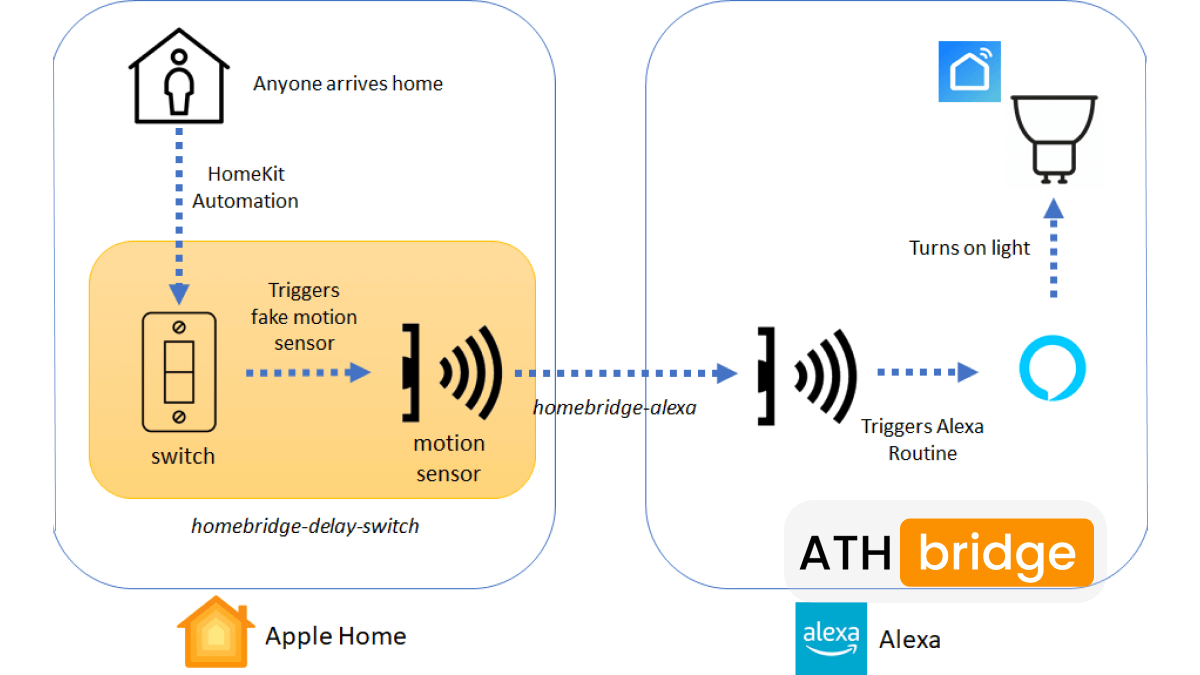
- Create Automation: Leverage the automation capabilities of HomeKit to create routines involving your Alexa devices. For instance, set them to turn on when you arrive home or adjust colors based on specific triggers.
- Voice Control with Siri
- Enable Siri Voice Control: If desired, enable voice control for your Alexa devices using Siri. ATH Bridge supports Siri integration, allowing you to control your devices through voice commands.
- Configure Siri Commands: Set up Siri commands for your Alexa devices by following the instructions provided by the ATH Bridge documentation.
I have used this guide to add Vivint to HomeKit as well, Geeni HomeKit as well!
Method 2: Matter Protocol
Matter is a universal smart home standard supported by Amazon, Apple, and Google. A Matter-certified device can be added to both Alexa and HomeKit simultaneously using its "Multi-Admin" feature — no bridge required.
How to use Multi-Admin sharing:
- Commission the Matter device into Apple HomeKit using its QR code.
- In the Apple Home app, navigate to the device settings and generate a new setup code.
- Open the Amazon Alexa app → Add Device → Matter → enter the code from Apple Home.
Limitation: Requires purchasing new Matter-certified hardware. Existing Alexa-only devices are not compatible with this method.
Method 3: Homebridge or Home Assistant (DIY)
Homebridge and Home Assistant are open-source platforms that translate non-HomeKit devices into HomeKit-compatible accessories. They require running a server (Raspberry Pi, NAS, or spare computer) on your local network.
- Homebridge — simpler setup, large plugin library, focused on HomeKit integration.
- Home Assistant — more powerful, supports two-way control between ecosystems, steeper learning curve.
- HOOBS — a pre-built hardware appliance running Homebridge, for users who want DIY software without DIY setup.
Best for: Users with a home full of legacy Alexa-only devices who have technical experience and want a free solution.
Tradeoff: Requires ongoing maintenance. Plugin updates or firmware changes can break integrations.
Method 4: Dual-Compatible Hardware
Some brands ship devices with both Alexa and HomeKit support out of the box. Register them in each ecosystem's app independently — no bridge needed.
| Device | Type | Notes |
|---|---|---|
| Ecobee Smart Thermostat Premium | Thermostat | Works with both ecosystems natively |
| Aqara Camera Hub M3 | Hub / Camera | Bridges Aqara sensors into both simultaneously |
| Meross Smart Wi-Fi Plug Mini | Smart plug | Budget-friendly dual-platform support |
Best for: New device purchases where you want zero-configuration dual compatibility.
Key Limitations to Know
Voice command conflicts: Alexa cannot trigger HomeKit-exclusive automations (such as HomeKit scenes), and Siri cannot trigger Alexa routines, without custom programming. Each assistant controls its own ecosystem's features.
Remote access requires a hub: To control HomeKit devices away from home, you need an Apple TV (4th gen or later) or a HomePod acting as a home hub. Without one, HomeKit remote access is unavailable regardless of which bridge method you use.
Privacy difference: HomeKit processes data locally and encrypts device communications end-to-end. Alexa relies on cloud processing. If local control and privacy matter to you, HomeKit is the more secure ecosystem.
Firmware updates can break bridges: For software-based bridges (Homebridge, Home Assistant), manufacturer firmware updates occasionally break plugin compatibility. The ATH Bridge mitigates this through regular pre-tested firmware releases.
These are basically what I did with my Alexa HomeKit integration, and something you will be able to get by adding Alexa to HomeKit.
- Hands Free Control Over HomeKit Devices
- Routines That Simplify My Life
- Smarter Automation with Alexa’s Routines
- A Unified Smart Home Experience
I can now control all my HomeKit accessories using Alexa’s voice commands. Whether it is adjusting the thermostat, dimming the lights or locking the doors. I don’t have to pull out my phone or open multiple apps. Just a quick “Alexa, turn off the lights.” and it is done!
One of the best things I set up was an “Alexa, good night.” routine. With a single command, my HomeKit lights turn off, my smart locks engage, and the thermostat adjusts to a comfortable sleeping temperature. It’s like my house understands what I need.
Alexa’s automation capabilities let me do things that HomeKit alone couldn’t. I set up motion sensors to trigger HomeKit devices like having my thermostat adjust when Alexa detects someone entering a room. These little automations make my home more intuitive.
Before, I had to deal with device compatibility issues between Alexa and HomeKit. Now, everything works together seamlessly. I don’t have to think about which platform a device belongs to, Alexa and HomeKit bridge the gap connecting the house!
Workarounds for Multi-Ecosystem Homes
Use separate hubs for each ecosystem: Use a HomePod, HomePod mini, or compatible Apple TV as your Apple home hub. Keep your Echo devices for Alexa. Each hub can manage its own ecosystem.
Keep automations separate: Apple Home automations and Alexa routines work separately. Create Apple Home automations in the Home app and Alexa routines in the Alexa app.
Choose the right voice assistant: Use Siri for devices available in Apple Home and Alexa for devices connected to Alexa. If a supported device is exposed to Apple Home through ATH Bridge, Siri may also be able to control its supported functions.
Use Matter when possible: Matter-compatible devices can be shared between Apple Home and Alexa using Matter Multi-Admin. This lets both ecosystems control the same supported device without directly connecting Alexa to Apple Home.
Does Matter Let Alexa Work with HomeKit?
Yes, for Matter-certified devices. Matter is a smart home interoperability standard backed by Apple, Amazon, Google, and Samsung. A device that supports Matter can be added to multiple ecosystems at once, so a Matter bulb can live in both Alexa and HomeKit without a separate bridge. As of 2026, Amazon routes "Works with Alexa" Matter certification through CSA testing facilities, which has expanded the catalog of Matter-ready devices — but coverage is still limited to certified hardware, which is why a bridge remains necessary for everything else.
Amazon Alexa supports Matter, allowing smart devices from different brands to work together locally, no extra hubs or cloud skills required. Compatible Echo and eero devices act as Matter controllers, letting you set up and control devices over Wi-Fi or Thread.
Supported Controllers
You need at least one of these:
- Echo speakers: Echo Dot (3rd Gen+), Echo (2nd Gen+), Echo Pop, Echo Studio
- Echo displays: Echo Show 5, 8, 10, 15, 21
- eero routers: eero 6/6+, Pro 6/6E, Max 7, PoE
Note: Some devices (e.g., Echo 4th Gen, eero Pro) also act as Thread Border Routers.
Supported Device Types
Alexa can control Matter-certified:
- Lighting & power: bulbs, plugs, switches
- Climate: thermostats, fans, ACs, air purifiers
- Security: locks, blinds
- Sensors: motion, contact sensors, buttons
- Appliances: robot vacuums, dishwashers
Setup (Quick Steps)
- Power on device (pairing mode)
- Open Alexa app → Devices → +
- Tap Add Device → Other → Matter
- Scan QR code (or enter code)
- Assign name and room
Multi-Admin (Use with Other Platforms)
You can share the same device with Apple Home, Google Home, etc.:
- Open device in Alexa app
- Go to settings → Other Assistants and Apps
- Tap Add Another
- Copy the pairing code
- Add it in the other platform within 15 minutes
Which Alexa Devices Work with HomeKit via the ATH Bridge?
Devices you have paired into the Alexa app — smart plugs, bulbs, switches, thermostats, and locks — are the most reliably bridged. Echo hardware can also be surfaced, though with a narrower function set. The table below lists commonly bridged Echo hardware.
| Echo Dot | Echo Auto |
|---|---|
| Echo Input | Echo Frames |
| Echo Studio | Echo Sub |
| Echo Wall Clock | Echo Glow |
| Echo Flex | Echo Loop |
| Echo Buds | Echo Show 8 (2nd Gen) |
| Echo Link | Echo Show 10 (3rd Gen) |
| Echo Link Amp | Echo Show 15 |
| Echo Spot | Echo Dot (with clock) |
ATH Bridge vs Matter vs Native Apps: Which Should You Use?
Direct answer: use the ATH Bridge if you want any Alexa-linked device in HomeKit without replacing hardware. Use Matter if all your devices are Matter-certified. Using the apps side by side requires no bridge but gives you no shared control.
| Method | Bridges Alexa → HomeKit | Siri voice control | Local or cloud | Setup difficulty | Cost |
|---|---|---|---|---|---|
| ATH Bridge | Yes, most Alexa-linked devices | Yes | Local (Homebridge) | Moderate | One-time hardware cost |
| Matter | Only Matter-certified devices | Yes, for Matter devices | Local | Low–moderate | Free if devices support it |
| Run both apps separately | No shared control | No | Cloud | None | Free |
How to Set Up Apple Home and Alexa in the Same Household
- Set up Apple Home. Add your Apple Home-compatible devices in the Home app. Set up a HomePod, HomePod mini, or compatible Apple TV as your Apple home hub if needed.
- Set up Alexa. Add your Echo devices and Alexa-compatible smart devices in the Alexa app.
- Check which devices support both ecosystems. Some Matter-compatible devices can work with both Apple Home and Alexa.
- Share Matter devices when supported. Add the Matter device to one ecosystem first. Then use its Matter sharing option to add it to the other ecosystem.
- Use a bridge for supported non-Matter devices if needed. ATH Bridge can help expose supported devices to Apple Home through Homebridge. Compatibility depends on the device and available plugin.
- Create automations separately. Set up Apple Home automations in the Home app and Alexa routines in the Alexa app.
- Test both voice assistants. Test Siri with your Apple Home devices and Alexa with your Alexa devices. For bridged devices, test which functions are available in Apple Home.
Pros and Cons of Using Apple Home and Alexa Together
Pros
- Use Siri and Alexa in the same household
- Share supported Matter devices across both ecosystems
- Keep many of your existing smart home devices
- Use ATH Bridge for supported devices that need a bridge to Apple Home
Cons
- Apple Home automations and Alexa routines are managed separately
- Managing two ecosystems can make setup more complex
- Not every device or feature works across both platforms
- Some non-Matter devices may need an additional bridge
Troubleshoot Alexa HomeKit Integration With an ATH Bridge
- Check Wi-Fi Connection: Ensure both Alexa and the ATH Bridge are on the same 2.4GHz network.
- Restart Devices:Restart both the ATH Bridge and Alexa device.
- Update Firmware: If the your Alexa devices are not connecting properly, try reconnecting them to the ATH Bridge.
- Verify HomeKit Setup: Make sure devices are properly added to the Home app on your iPhone.
- Enable Alexa Skill: Ensure the correct HomeKit skill is enabled in the Alexa app.
Is the ATH Bridge Worth It for Alexa HomeKit?
For anyone running both ecosystems, the ATH Bridge is the most direct way to unify them without replacing hardware. It is local-first, avoids per-device subscriptions, and works with devices Matter does not yet cover. As with any third-party bridge, you are relying on community-maintained plugins rather than an official integration. So occasional re-authentication or updates are part of ownership. For most mixed Alexa/HomeKit homes, that trade-off is worth the unified control it delivers.
FAQs about the Alexa HomeKit Integration
Can I connect Alexa to Apple HomeKit?
No, Alexa and HomeKit have no native integration. You can bridge them using a third-party solution like the ATH Bridge, or use Matter-certified devices, which can be added to both ecosystems at once.
What is the best way to integrate Alexa with HomeKit?
The best method depends on your devices. The ATH Bridge works with most Alexa-linked devices and requires no Matter support. If all your devices are Matter-certified, Matter is the simpler, free option since it needs no separate bridge.
Can I control HomeKit accessories with Alexa?
Yes, but only through a bridge such as the ATH Bridge that exposes HomeKit accessories to Alexa. Some Matter-certified devices also work across both platforms simultaneously without a bridge.
Can I use Alexa routines with HomeKit devices?
Yes. Once your HomeKit devices are bridged into Alexa through the ATH Bridge, you can include them in Alexa routines for automation and voice control alongside your other Alexa devices.
Does Matter help Alexa work with HomeKit?
Yes. Matter is a cross-platform standard supported by both Alexa and HomeKit. A Matter-certified device can be added to both ecosystems at once, though coverage is limited to certified hardware — non-Matter devices still need a bridge.
Do Echo speakers themselves appear in HomeKit?
Echo hardware can be surfaced through the ATH Bridge, but with a narrower function set than a native HomeKit accessory. For full voice and automation control, the reliable path is to pair devices into Alexa first, then bridge those devices into HomeKit.
Does the ATH Bridge require a subscription?
No. The ATH Bridge is a one-time hardware purchase that runs locally via Homebridge. There is no mandatory per-device or per-month subscription to bridge Alexa devices into HomeKit.

Sarah Diyana
3 years of experience in smart home & HomeKit I want to share knowledge with anyone struggling to add incompatible devices to HomeKit. Experienced with many workarounds, write about the best methods.